JSON to Markdown: Tables, Lists & Scripts
Quick answer: JSON to Markdown conversion turns a flat array of JSON objects into a GFM pipe table, with keys as column headers and each object as a row. Nested objects become hierarchical bullet lists instead. Tables suit tabular API data; lists preserve tree structure that a grid would flatten.
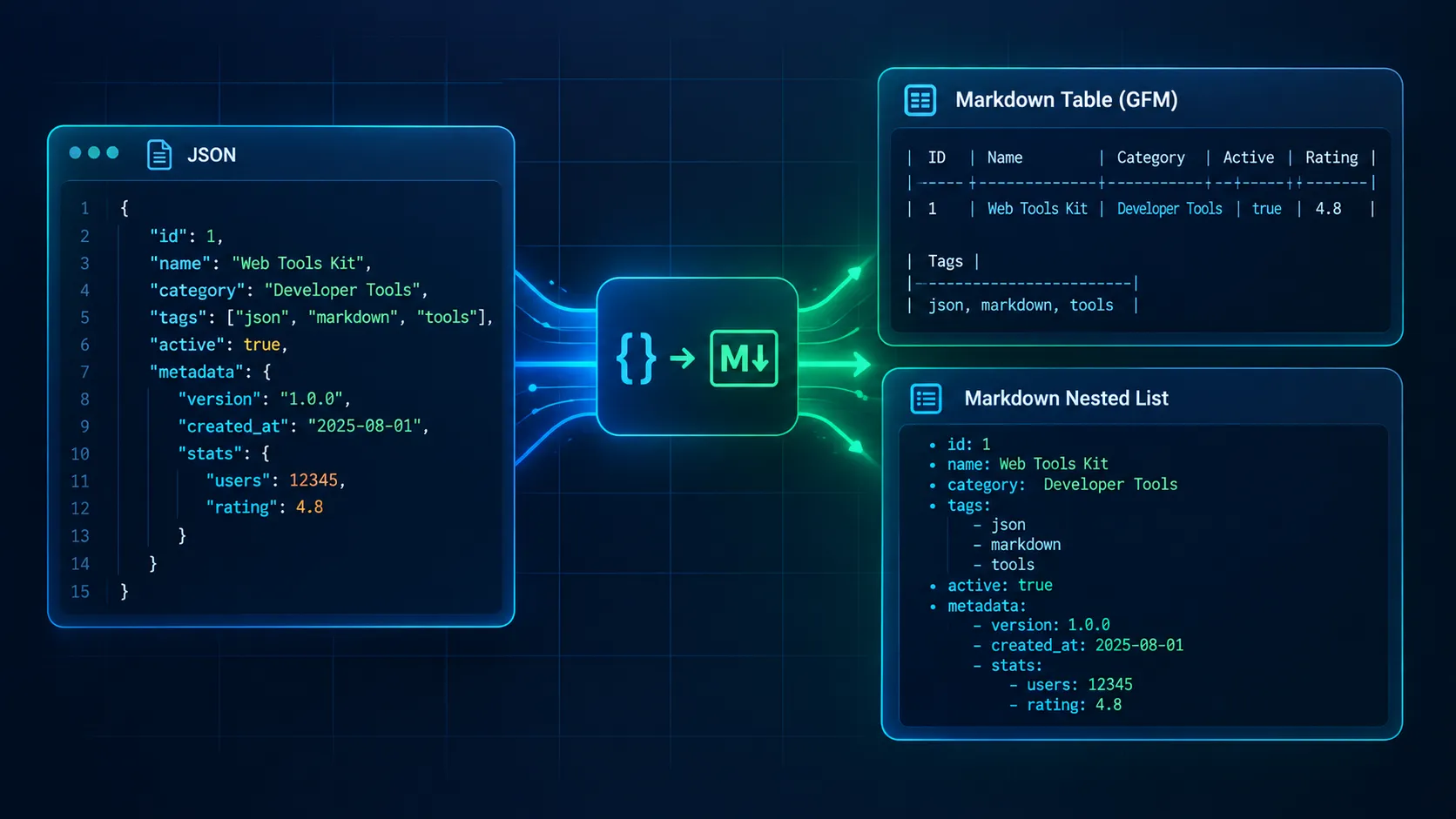
Input JSON:
[{"id": 1, "name": "API"}, {"id": 2, "name": "Docs"}]
Markdown output:
| id | name |
| --- | --- |
| 1 | API |
| 2 | Docs |
Rendered result:
| id | name |
|---|---|
| 1 | API |
| 2 | Docs |
Paste your own array into the free JSON to Markdown converter for instant, zero-install processing in your browser. The rest of this guide covers when to pick a table or a list, how to script the conversion in Python, Node.js, and jq, and how to survive pipes, nulls, and Unicode.
JSON to Markdown: Choose a Table or a List
The shape of the JSON decides the output format. Picking wrong produces either an unreadable grid or a flat list that hides the pattern in your data.
When a JSON array should become a Markdown table
Use a table when every element is an object and the objects share most of their keys. REST list endpoints, database exports, and audit-log summaries all fit.
Build the columns from the union of keys across all records, not from the first record alone. Optional properties often appear for the first time in record 40, and a first-record header silently drops them. Keep tables to roughly eight columns with scalar values; wider grids become unreadable once a site theme constrains the content width.
If your data already lives in a spreadsheet export, the CSV to Markdown converter skips the JSON step entirely.
When nested JSON should become a list
Use a list for hierarchies: configuration files, manifest fragments, OpenAPI snippets. A table forces each nested object into a single cell, and naive code prints [object Object] in JavaScript or a single-quoted Python repr that is not valid JSON.
Arrays of primitives, such as ["EU", "JP"], also belong in lists because they have no keys to become columns. For mixed payloads, render the records as a table and either store nested values as compact JSON in the cell or promote them to a list below the table.
How to Convert JSON to Markdown Online
The browser tool needs no install, account, or command line:
- Open the converter and paste your JSON into the input panel, or upload a
.jsonfile. - The tool detects the shape automatically. An array of objects becomes a pipe table; nested objects and primitive arrays become a nested list.
- Review the output, then copy it or download it as a
.mdfile.
To convert JSON to Markdown table online, paste the array and copy the result straight into your README, wiki, or pull request.
Privacy: verify it yourself
JSON parsing and table conversion run 100% client-side in the browser via JavaScript; payload data is never transmitted to an external server. Telemetry is completely cookieless and aggregate.
You do not have to take that on trust. Open your browser's DevTools (F12, or Cmd+Option+I on macOS) and switch to the Network tab. Clear the log, paste your JSON, and run the conversion. You should see no request carrying your payload, no POST body containing your data, and no upload of the file you selected. This matters when the JSON contains customer records, tokens, or internal API responses.
The JSON tool is one of 16 specialized converters to Markdown on the all-in-one Markdown conversion workspace (16 dedicated converters), which also covers spreadsheets, delimited text, and other source formats.
How to Write and Format JSON in Markdown
If you only need to insert JSON in Markdown for display, you do not need a converter. Use a fenced code block with the json language tag so renderers apply syntax highlighting:
```json
{
  "id": "3f2b8c1e-9a47-4d6e-b1c5-7e2a90d4f6a1",
  "city": "東京",
  "active": true,
  "note": null
}
That answers "how to write JSON in Markdown" and "how to format JSON in Markdown": open the fence with three backticks and `json`, paste valid JSON, close the fence. Valid means double-quoted keys and strings, no trailing commas, and no comments. If you need comments in an example, use the `jsonc` tag instead. Pretty-print with two-space indentation so diffs stay readable.

The two approaches solve different problems:

- **Fenced code block:** shows the JSON verbatim. Data types, nesting, and exact syntax are preserved, but readers cannot scan or compare rows.
- **Table or list conversion:** reshapes the data into Markdown structure. Readers can scan it, but type information is lost and the output is no longer JSON.

Use code blocks to document an API contract. Use tables to present the data itself.

## Convert Flat JSON Arrays to GFM Pipe Tables

### The union-of-keys rule

Collect every key from every record, in first-seen order. Write one column per key. When a record lacks a key, leave its cell empty. That keeps optional properties visible and separates two cases that look alike:

- **Missing key:** the property was absent, so the cell is empty.
- **Explicit null:** the property was present with no value, so the cell shows the text `null`.

### Test fixture

This payload mixes a leading-zero string, an explicit null, Japanese text, an umlaut, a pipe character, and a key that appears only in the second record:

```json
[
  {
    "id": "3f2b8c1e-9a47-4d6e-b1c5-7e2a90d4f6a1",
    "code": "007",
    "city": "東京",
    "note": null,
    "created": "2026-03-14T09:26:53Z"
  },
  {
    "id": "b7d41e02-5c38-4f9a-8e16-2a0c9d73b5e4",
    "code": "042",
    "city": "München",
    "note": "Status: a|b",
    "created": "2026-03-14T10:02:11Z",
    "owner": "Jürgen Weiß"
  }
]
Correct GFM output:
| id | code | city | note | created | owner |
| --- | --- | --- | --- | --- | --- |
| 3f2b8c1e-9a47-4d6e-b1c5-7e2a90d4f6a1 | 007 | 東京 | null | 2026-03-14T09:26:53Z |  |
| b7d41e02-5c38-4f9a-8e16-2a0c9d73b5e4 | 042 | München | Status: a\|b | 2026-03-14T10:02:11Z | Jürgen Weiß |
Check four things: owner exists as a column even though record one lacks it, 007 kept its zeros, null is distinguishable from the empty owner cell, and the pipe in a|b is escaped.
Pipes and newlines
An unescaped | inside a value splits the cell and shifts every column to its right. Replace each | with \|. A table row must also fit on one line, so a value containing a newline needs its line breaks replaced with <br>, which GitHub and most static-site renderers display as a break.
The "007" case is a type problem, not a Markdown problem. A JSON string stays a string through conversion. The damage happens downstream: pandas.read_json infers dtypes by default and can turn "007" into 7 unless you pass dtype=False.
Convert Nested JSON to Markdown Lists or Collapsible Sections
Nested bullets
For a configuration object, render each key as a bold label and indent children two spaces:
{
  "service": "billing-api",
  "version": "2.4.1",
  "regions": ["eu-central-1", "ap-northeast-1"],
  "limits": {
    "rps": 120,
    "contact": { "team": "Zahlungen", "email": null }
  }
}
- **service:** billing-api
- **version:** 2.4.1
- **regions:**
  - eu-central-1
  - ap-northeast-1
- **limits:**
  - **rps:** 120
  - **contact:**
    - **team:** Zahlungen
    - **email:** null
One key per line means depth is visible and nothing becomes [object Object]. Array items become child bullets.
Collapsible sections for large trees
A 300-line response makes a poor bullet list. Wrap the full payload in an HTML <details> block and keep the page scannable:
<details>
<summary>Full response (87 fields)</summary>

```json
{ "service": "billing-api", "version": "2.4.1" }
The blank line after </summary> is required; without it, many renderers do not parse the Markdown inside the HTML block. For tab-separated database exports, the TSV to Markdown converter is faster than reshaping them into JSON first.
JSON to Markdown with Python, Node.js, jq, and Pandoc
Use scripts when conversion belongs in CI/CD, a docs build, or a pre-commit hook.
Python
This script uses only the standard library. It builds columns from the union of keys, escapes pipes, converts newlines to <br>, keeps "007" as a string, and prints null for explicit nulls while leaving missing keys empty. Save it as json2md.py:
#!/usr/bin/env python3
"""json2md.py - convert a JSON array of objects to a GFM pipe table."""
import json
import sys
NULL_TEXT = "null" # key present, value null MISSING_TEXT = "" # key absent from this record
def cell(value): if value is None: return NULL_TEXT if isinstance(value, bool): return "true" if value else "false" if isinstance(value, (dict, list)): value = json.dumps(value, ensure_ascii=False, separators=(",", ":")) text = str(value) text = text.replace("|", "|") return text.replace("\r\n", "<br>").replace("\n", "<br>").replace("\r", "<br>")
def to_table(records): if not ( isinstance(records, list) and records and all(isinstance(r, dict) for r in records) ): raise ValueError("Expected a non-empty JSON array of objects")
keys, seen = [], set() for record in records: for key in record: if key not in seen: seen.add(key) keys.append(key)
lines = [ "| " + " | ".join(cell(k) for k in keys) + " |", "| " + " | ".join("---" for _ in keys) + " |", ] for record in records: row = [cell(record[k]) if k in record else MISSING_TEXT for k in keys] lines.append("| " + " | ".join(row) + " |") return "\n".join(lines)
if name == "main": sys.stdout.reconfigure(encoding="utf-8") if len(sys.argv) > 1: with open(sys.argv[1], encoding="utf-8") as fh: data = json.load(fh) else: data = json.load(sys.stdin) print(to_table(data))
Run it with python json2md.py data.json > table.md. The json module returns "007" as a str, so leading zeros survive.
Node.js
Same logic with JSON.parse and explicit cell escaping. Save as json2md.js:
#!/usr/bin/env node
// json2md.js - JSON array of objects -> GFM pipe table
const fs = require("node:fs");
const cell = (value) => { if (value === null) return "null"; if (typeof value === "object") value = JSON.stringify(value); return String(value).replace(//g, "|").replace(/\r\n|\r|\n/g, "<br>"); };
const toTable = (records) => { const valid = Array.isArray(records) && records.length > 0 && records.every((r) => r !== null && typeof r === "object" && !Array.isArray(r)); if (!valid) throw new Error("Expected a non-empty JSON array of objects");
const keys = [...new Set(records.flatMap((r) => Object.keys(r)))];
const lines = [
| ${keys.map(cell).join(" | ")} |,
| ${keys.map(() => "---").join(" | ")} |,
];
for (const record of records) {
const row = keys.map((k) => (k in record ? cell(record[k]) : ""));
lines.push(| ${row.join(" | ")} |);
}
return lines.join("\n");
};
const raw = fs.readFileSync(process.argv[2] ?? 0, "utf8"); console.log(toTable(JSON.parse(raw)));
Two Node-specific traps: JSON.parse reads numbers as doubles, so an integer ID above 253 (9007199254740993) silently loses precision, and Object.keys lists integer-like keys such as "1" and "2" in ascending order before other keys, regardless of their order in the file.
jq
For a one-line pipeline in a shell script or CI job:
jq -r '
def cell:
if . == null then "null"
elif type == "string" then gsub("\\|"; "\\|") | gsub("\r?\n"; "<br>")
elif type == "array" or type == "object" then tojson | gsub("\\|"; "\\|")
else tostring end;
(reduce (.[] | keys_unsorted[]) as $k ([]; if index($k) then . else . + [$k] end)) as $keys
| "| " + ($keys | join(" | ")) + " |",
"|" + ($keys | map(" --- |") | join("")),
(.[] as $row
| "| " + ($keys | map(. as $k | if ($row | has($k)) then ($row[$k] | cell) else "" end) | join(" | ")) + " |")
' data.json > table.md
The reduce builds the key union in first-seen order. Like the scripts above, it expects an array of objects and fails on anything else.
Where Pandoc fits
Pandoc's JSON reader expects Pandoc's own AST JSON, a document tree with pandoc-api-version, meta, and blocks. It does not read an arbitrary API payload like the fixtures above. Running pandoc -f json -t gfm on [{"id": 1}] produces an error, not a table.
Pandoc earns its place in a different pipeline: convert Markdown to AST JSON with pandoc -t json, transform the tree with a filter, then write GFM with pandoc -f json -t gfm. For application data, use the scripts or the browser tool.
If your source is a workbook, use the Excel to Markdown converter. The delimiter and quoting pitfalls that overlap with these scripts are covered in the CSV to Markdown guide.
The JSON Edge-Case Test Matrix
Each row is a hazard tested against payloads; each column is a method. Treat the cells as a checklist for your own pipeline.
| Hazard | Browser tool | Python script | Node.js script | jq filter | Pandoc |
|---|---|---|---|---|---|
| 1. Flat object arrays vs. primitive arrays | Object arrays become tables; primitive arrays become lists | Tables only; primitives raise an error | Tables only; primitives raise an error | Tables only; primitives fail on keys_unsorted | Rejects non-AST JSON |
| 2. Deeply nested objects (3+ levels) | Nested list keeps depth | Inline compact JSON in the cell | Inline compact JSON in the cell | Inline compact JSON in the cell | Not applicable |
| 3. Pipes, quotes, newlines in strings | Pipes escaped, newlines become <br> |
` | and handled incell()` |
` | and handled incell()` |
| 4. Nulls, booleans, [], missing keys | null shown as text; missing keys empty | null text; [] as []; missing empty | Same as Python | Same as Python | Not applicable |
| 5. Large or minified payloads | Limited by browser memory | Minified is fine; loads the full file | Minified is fine; numbers above 253 lose precision | Minified is fine; --stream for huge files |
Not applicable |
| 6. Unicode (東京, Grüße) | UTF-8 safe | Open files with encoding="utf-8" |
Read with "utf8" |
UTF-8 safe; check console code page on Windows | UTF-8 safe |
Practical workarounds
- Arrays of objects vs. primitives: Branch on type before rendering:
all(isinstance(r, dict) ...)selects the table path, anything else becomes a bullet list. Fail loudly instead of printing a malformed table. - Deep nesting: Flatten into dot-path columns (
address.city) for one or two levels. Past that, switch to the nested-list pattern or wrap the raw JSON in<details>. - Pipes, quotes, and newlines: Escape
|as\|and replace newlines with<br>. Quotes need no escaping in GFM cells. Backticks inside a cell can clash with code spans, so wrap such values deliberately. - Nulls, booleans, empty arrays, missing keys: Pick one convention and document it. This guide renders null as
null, booleans astrueandfalse,[]as[], and missing keys as empty cells. The reverse script in the next section reads the same convention back. - Large payloads: Above tens of megabytes, split first:
jq -c '.[]' big.json | split -l 5000 - chunk_, then wrap each chunk withjq -s . chunk_aa. A single table with thousands of rows also renders slowly, so consider publishing it as a downloadable file. - Unicode: Set UTF-8 explicitly on every file open, and on Windows set
PYTHONUTF8=1or usesys.stdout.reconfigure. Never\uXXXX-escape output (ensure_ascii=False), or 東京 turns into escape sequences in your Markdown.
How to Convert Markdown to JSON with Python
The reverse direction is common when documentation tables must feed a test suite, a config loader, or an API mock. This script uses only the standard library. It reads GFM pipe tables, skips delimiter rows and fenced code blocks, splits on unescaped pipes only, unescapes \|, restores <br> to newlines, and keeps every value a string by default so 007 stays 007. Save it as md2json.py:
#!/usr/bin/env python3
"""md2json.py - parse a GFM pipe table from Markdown into JSON (or CSV).
Conventions (match json2md.py):
- cell text "null" (see --null-text) -> JSON null
- empty cell -> key omitted from the object
- everything else -> string, unless --infer-types """ import argparse import csv import json import re import sys
DELIMITER_ROW = re.compile(r"^\s*?\s*:?-+:?\s*(\s*:?-+:?\s*)?\s$") UNESCAPED_PIPE = re.compile(r"(?<!)") BREAK_TAG = re.compile(r"<br\s*/?>", re.IGNORECASE) INT = re.compile(r"-?(0|[1-9]\d*)") FLOAT = re.compile(r"-?(0|[1-9]\d*)\d*[1-9]")
def split_row(line): line = line.strip() if line.startswith("|"): line = line[1:] if line.endswith("|") and not line.endswith("|"): line = line[:-1] cells = [] for raw in UNESCAPED_PIPE.split(line): text = raw.strip().replace("|", "|") cells.append(BREAK_TAG.sub("\n", text)) return cells
def parse_tables(markdown): lines = markdown.splitlines() tables, i, in_fence = [], 0, False while i < len(lines): line = lines[i] if line.lstrip().startswith("```") or line.lstrip().startswith("~~~"): in_fence = not in_fence i += 1 continue is_header = ( not in_fence and "|" in line and i + 1 < len(lines) and "|" in lines[i + 1] and DELIMITER_ROW.match(lines[i + 1]) ) if not is_header: i += 1 continue header = split_row(line) rows, i = [], i + 2 while i < len(lines) and lines[i].strip() and "|" in lines[i]: rows.append(split_row(lines[i])) i += 1 tables.append((header, rows)) return tables
def infer(value): if value in ("true", "false"): return value == "true" if INT.fullmatch(value): # "007" fails this and stays a string return int(value) if FLOAT.fullmatch(value): # "1.50" fails this and stays a string return float(value) return value
def to_records(header, rows, null_text, infer_types): records = [] for cells in rows: cells = (cells + [""] * len(header))[: len(header)] record = {} for key, value in zip(header, cells): if value == "": continue if value == null_text: record[key] = None else: record[key] = infer(value) if infer_types else value records.append(record) return records
def main(): parser = argparse.ArgumentParser(description="GFM pipe table -> JSON") parser.add_argument("file", nargs="?", help="Markdown file (default: stdin)") parser.add_argument("--table", type=int, default=1, help="1-based table index") parser.add_argument("--null-text", default="null") parser.add_argument("--infer-types", action="store_true", help="convert true/false and canonical numbers") parser.add_argument("--csv", action="store_true", help="emit CSV instead of JSON") args = parser.parse_args()
sys.stdout.reconfigure(encoding="utf-8") if args.file: with open(args.file, encoding="utf-8") as fh: markdown = fh.read() else: markdown = sys.stdin.read()
tables = parse_tables(markdown) if not tables: sys.exit("No pipe table found") if not 1 <= args.table <= len(tables): sys.exit(f"--table must be between 1 and {len(tables)}")
header, rows = tables[args.table - 1] records = to_records(header, rows, args.null_text, args.infer_types)
if args.csv: writer = csv.DictWriter(sys.stdout, fieldnames=header, lineterminator="\n") writer.writeheader() writer.writerows(records) else: print(json.dumps(records, ensure_ascii=False, indent=2))
if name == "main": main()
Input and exact output
Input table.md:
| id | code | city | note | owner |
| --- | --- | --- | --- | --- |
| 3f2b8c1e-9a47-4d6e-b1c5-7e2a90d4f6a1 | 007 | 東京 | null |  |
| b7d41e02-5c38-4f9a-8e16-2a0c9d73b5e4 | 042 | München | Status: a\|b | Jürgen Weiß |
Command: python md2json.py table.md
Output:
[
{
"id": "3f2b8c1e-9a47-4d6e-b1c5-7e2a90d4f6a1",
"code": "007",
"city": "東京",
"note": null
},
{
"id": "b7d41e02-5c38-4f9a-8e16-2a0c9d73b5e4",
"code": "042",
"city": "München",
"note": "Status: a|b",
"owner": "Jürgen Weiß"
}
]
The first record has no owner because its cell was empty, null became a real JSON null, and a\|b came back as a|b. The trade-off: an original empty string and a missing key look identical in Markdown, so both come back as an omitted key. If that distinction matters, render empty strings with a sentinel and map it back with --null-text style logic.
Add --infer-types to turn true, false, and canonical numbers into JSON types. 007 and 1.50 still stay strings because they would not survive a round trip as numbers.
How to Pass Variables into JSON in Markdown: Hugo, Jekyll & Docusaurus
"How to pass a variable inside JSON Markdown" covers two jobs: putting variables in a page's front matter, and feeding JSON data files into Markdown content. Static-site generators handle both, but Markdown itself has no variable syntax.
Hugo
Hugo accepts front matter in JSON, delimited by curly braces at the top of the file:
{
"title": "Release 2.4",
"version": "2.4.1",
"regions": ["EU", "JP"]
}
Templates read these as {{ .Params.version }}; Hugo lowercases param keys. Inside Markdown content, use the built-in shortcode {{< param "version" >}}.
For tabular data, put cities.json in the data/ directory and read it through site.Data. Create layouts/shortcodes/json-table.html:
{{- $rows := index site.Data (.Get 0) -}}
<table>
<thead><tr><th>Code</th><th>City</th></tr></thead>
<tbody>
{{- range $rows }}
<tr><td>{{ .code }}</td><td>{{ .city }}</td></tr>
{{- end }}
</tbody>
</table>
Call it from any page with {{< json-table "cities" >}}.
Jekyll
Jekyll uses YAML front matter, so a page variable lives there and Liquid reads it as {{ page.version }}. JSON files in _data/ are exposed under site.data. Liquid runs before Markdown, so a loop can generate a pipe table directly:
| Code | City |
| --- | --- |
{% for row in site.data.cities -%}
| {{ row.code }} | {{ row.city }} |
{% endfor %}
Leave a blank line before the table. To embed data in a script tag instead, use the jsonify filter: {{ site.data.cities | jsonify }}.
Docusaurus
Docusaurus pages are MDX, so JSON can be imported as a module and rendered with JSX:
import cities from './cities.json';
import CodeBlock from '@theme/CodeBlock';
<table> <thead><tr><th>Code</th><th>City</th></tr></thead> <tbody> {cities.map((c) => ( <tr key={c.code}><td>{c.code}</td><td>{c.city}</td></tr> ))} </tbody> </table>
<CodeBlock language="json">{JSON.stringify(cities, null, 2)}</CodeBlock>
One MDX gotcha: curly braces in plain prose are parsed as JavaScript expressions. Raw JSON typed outside a fenced code block breaks the build, so always fence it.
Frequently Asked Questions
How do I convert JSON to Markdown?
Paste the JSON into a converter, or run a short script. An array of objects becomes a GFM pipe table using the union of all keys as headers; a nested object becomes an indented list. Escape pipes as \|, replace newlines with <br>, and keep string values like "007" untouched.
How do I format JSON in Markdown?
Wrap it in a fenced code block that opens with three backticks and the json language tag, then close with three backticks. Use valid JSON inside: double-quoted keys and strings, no trailing commas, no comments. Pretty-print with two-space indentation so the rendered block stays readable and diff-friendly.
Can nested JSON become a Markdown table?
Yes, with a trade-off. Flatten nested keys into dot-path columns such as address.city, or keep the nested value in one cell as compact JSON. Both work for shallow nesting. Past two or three levels, a nested bullet list or a collapsible details block preserves structure far better than a wide grid.
How do I convert Markdown to JSON?
Parse the GFM pipe table: split each row on unescaped pipes, skip the delimiter row, unescape \|, and zip cells with the header names into objects. Keep values as strings unless you opt in to type inference, so "007" never becomes 7. The Python script above does this with the standard library.
Does Markdown preserve JSON data types?
No. Markdown is text, so a table cell holding 42, "42", true, and null all become plain characters. Types survive only in fenced json blocks, which are verbatim. When converting back, you must infer types or agree on a convention, such as rendering null as the literal text null.
Summary: The Decision Rule
Match the output to the data's shape. Use a table for flat arrays of objects, built from the union of keys. Use a list for hierarchies and primitive arrays. Use scripts when the conversion must run in CI/CD, and use a fenced json block when you want to show the payload itself. Escape pipes, mark nulls explicitly, and keep identifiers like 007 as strings throughout.
For a quick one-off, paste your payload into the free JSON to Markdown converter and copy the result.